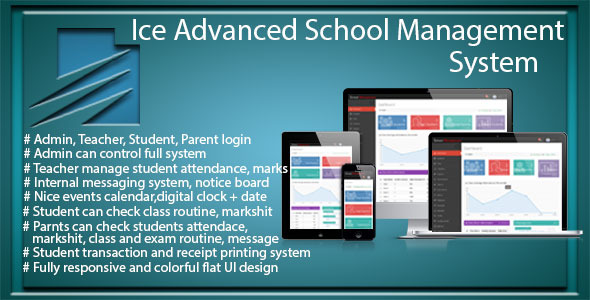
Ice Advanced School Management System
This is a more advanced school management system. This system has 4 user levels. Any educational institution.
- Admin
- Teacher
- Student
- Parent
Demo login information is given bellow:
- Admin: User email: admin@admin.com || Password: password
- Teacher User email: teacher@teacher.com || Password: password
- Student User email: student@student.com || Password: password
- Parents User email: parents@parents.com || Password: password
Administrator
- Admin can manage full this software.
- Add dynamic class, section and group.
- Admin can select student capacity in a class and section.
- Admin can view, edit and delete class’s information, section and group.
- Add new student in this software as student admission.
- Admin can view student’s details and parents information.
- Edit and delete student information.
- Admin can view the full school students attendance percentage.
- Students attendance percentage have two type a) Daily or running attendance percentage. b) Total or yearly attendance percentage.
- Add class routine for individual class.
- Add new teacher in this system.
- Can edit and delete any teacher’s information.
- Add dynamic subjects for every class.
- Can delete from any class also edit class subject information.
- Admin can declared notice for all user in this software.
- If admin want declared different notice for different user.
- Admin can make parents profile for this software.
- Admin can delete parents profile.
- Add grade with point for examination.
- Add exam and exam routine by different class.
- Admin can view all examination routine by class title and exam title.
- If admin want can edit and delete exam and examination routine.
- Admin can view the result of examination attendance.
- Admin can check result sheet and accept result sheet which is sent from teacher.
- Admin can complete the full result in a class and publish the result.
- Admin can publish the result in the school for all class.
- Admin can view any student’s mark sheet.
- Add new book and book’s category for library in this software.
- Admin can view, edit and delete books and book’s category from the library.
- Add new transport, route and vehicles for the school’s students, teachers and employee.
- Admin can edit and delete this route’s information in this software.
- Admin can add account title by account type for controlling the accounting in this software.
- Admin can edit and delete account title from this software.
- Admin can make student transaction slip when student give the tuition fee and other payments.
- Admin can view the full student transaction slip.
- If admin want to delete this slip, he can delete full slip at a time.
- If admin want to edit or delete one or two item in a slip, also he can do that.
- Admin can sent massage to any user in this software.
- Admin can delete his inbox massager only.
- Admin can view, edit and change his personal profile information.
- Admin can set or change the his profile picture, he also can change the password for this software.
- Admin can change the weekly of day in this software.
- Admin can change the general configuration settings.
- Admin can set or change the time zone.
- Admin have a personal events calendar as he wrote down his events in this calendar.
Teacher
- Teacher have a nice dashboard.
- Teacher can view the students information in details.
- Teacher can view the details information in a class with total student, section and routine.
- Teacher can view the class routine individual.
- Teacher can take attendance class students in online.
- Teacher can view the previous class students attendance.
- If need to change the attendance previous class teacher can do that.
- Teacher can view the other teacher’s information.
- Teacher can view the notice into notice board.
- Teacher can view the student’s parents information’s.
- Teacher can take student’s examination attendance in online.
- Teacher can view previous exam attendance.
- Teacher can view grade’s table information with point.
- Teacher can submit student’s examinations subject mark sheet in online to admin for accept that mark sheet.
- Teacher can view the all result which is published.
- Teacher can add new book category and new book into this software.
- Teacher can view the library book’s list.
- Teacher can view the transport information.
- Teacher can send message student, parents, teachers and admin by internal messaging system.
- Teacher can view and edit his profile information.
- Teacher can change this profile picture.
- Teacher can change his login password.
- Teacher have a personal events calendar as he wrote down his events in this calendar.
Student
- Student can view class routine.
- Student can view the class information.
- Student can view all class’s subject’s information.
- Student can know about the teacher’s information
- Student can view the notice board all notice which are only for declare students and all user’s notice.
- Student can know about the examination grading system and marks and point.
- Student can view the all class’s examination routine with his own examination routine.
- Student can view the examination results which is published.
- Student can view his own mark sheet
- Student can view the library books category and books.
- Student can send the message the teachers and his classmate.
- Student can view, edit and change his personal profile information.
- Student can set or change the his profile picture, he also can change the password for this software.
- Student have a personal events calendar as he wrote down his events in this calendar.
Parent
- Parents can view class routine.
- Parents can know about the teacher’s information and contact with them.
- Parents can view the notice board all notice which are only for declare students, parents and all user’s notice.
- Parents can know the all other parents information’s.
- Parents can know about the examination grading system and marks and point.
- Parents can view the all class’s examination routine with his own child’s examination routine.
- Parents can view the examination results which is published.
- Parents can view his own child’s mark sheet
- Parents can view the library books category and books.
- Parents can send the message the teachers and admin in this software.
- Parents can view, edit and change his personal profile information.
- Parents can set or change the his profile picture, he also can change the password for this software.
- Parents have a personal events calendar as he wrote down his events in this calendar.
Ice Advanced School Management System (Miscellaneous)

No comments:
Post a Comment